Start Doctor
The Start Doctor is a real-time diagnostic tool that watches your ECU data while you crank the engine and automatically checks the most common reasons an engine fails to start. When you stop the consultation it gives you a ranked list of problems to investigate, with direct links to the relevant settings page where appropriate.
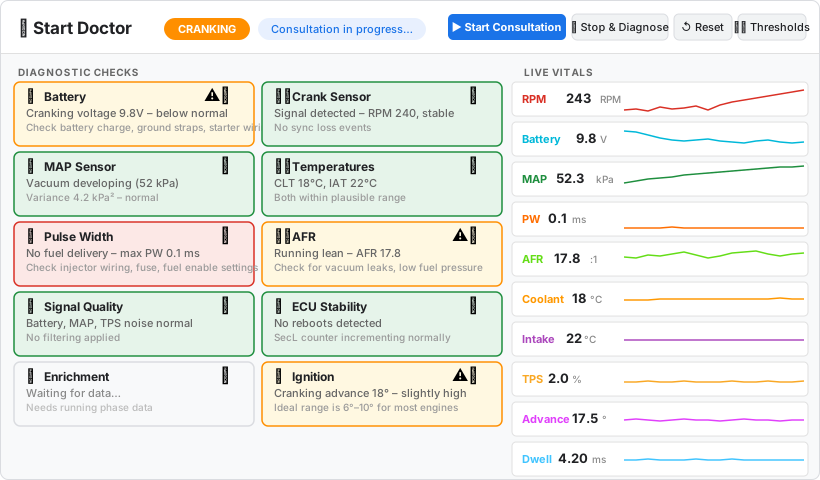
Opening the Start Doctor
Open the Start Doctor from the sidebar → Tools → 🩺 Start Doctor. The panel is only available when an ECU is connected or a log file is loaded.
The panel layout has four areas:
- Header bar - title, phase badge (IDLE / CRANKING / RUNNING / FAILED), and the control buttons.
- Diagnostic Checks (left column) - twelve cards, one per check, updated as data arrives.
- Live Vitals (right column) - ten real-time sparklines showing RPM, battery, MAP, pulse width, AFR, temperatures, TPS, advance, and dwell.
- Channel History (bottom) - a 10-second scrolling graph of RPM, battery voltage, MAP, pulse width, and AFR.
Running a Consultation
- Connect to your ECU (or load a log file - see Loading a Log File below).
- Click ▶ Start Consultation.
- Crank the engine as you normally would.
- The Start Doctor watches the data and updates the diagnostic cards as it gathers information.
- Click ⏹ Stop & Diagnose when you are done, or let the engine run - the Doctor automatically transitions to RUNNING or FAILED when the engine fires or cranking times out (10 seconds).
Auto-recording: As soon as you click Start Consultation, VETuner automatically begins recording a log file if one is not already in progress. The log is saved to a file when the consultation ends. This means you always have a recording of the diagnostic session to share with others.
Engine Phases
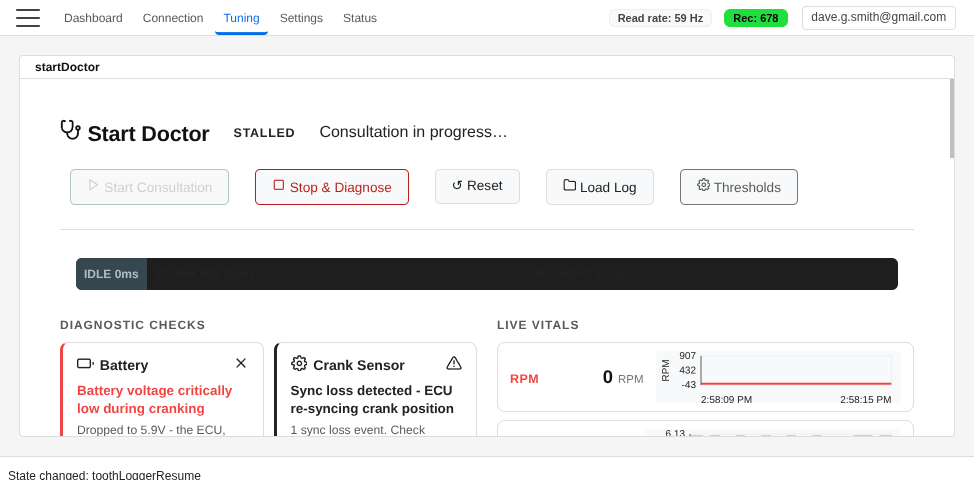
The Doctor tracks which phase the engine is in and adjusts all checks accordingly:
| Phase | Meaning |
|---|---|
| IDLE | Key on, engine not cranking. Battery baseline is captured here. |
| CRANKING | Battery voltage dropped ≥ 1.5 V - starter motor is engaged. RPM below 400. |
| RUNNING | RPM exceeded 400 - engine has started. |
| FAILED | Cranking exceeded 10 seconds without the engine firing. |
Once cranking is detected the phase only moves forward - only ↺ Reset returns to IDLE.
Diagnostic Cards
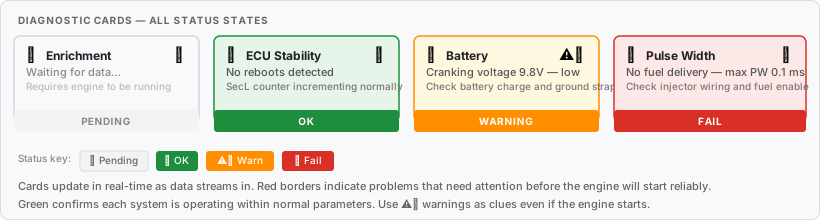
Each card corresponds to one automated check. The status icons and border colours tell you at a glance what the Doctor has found:
| Status | Meaning |
|---|---|
| ⏳ Pending | Not enough data yet, or the check only applies to a later phase. |
| ✅ OK | Channel is within the expected range. |
| ⚠️ Warning | Something is outside normal limits but not immediately fatal. |
| ❌ Fail | A clear problem that will prevent or impair starting. |
Cards update approximately every five samples (~100 ms at 50 Hz). Hover or tap a card to see its detail text.
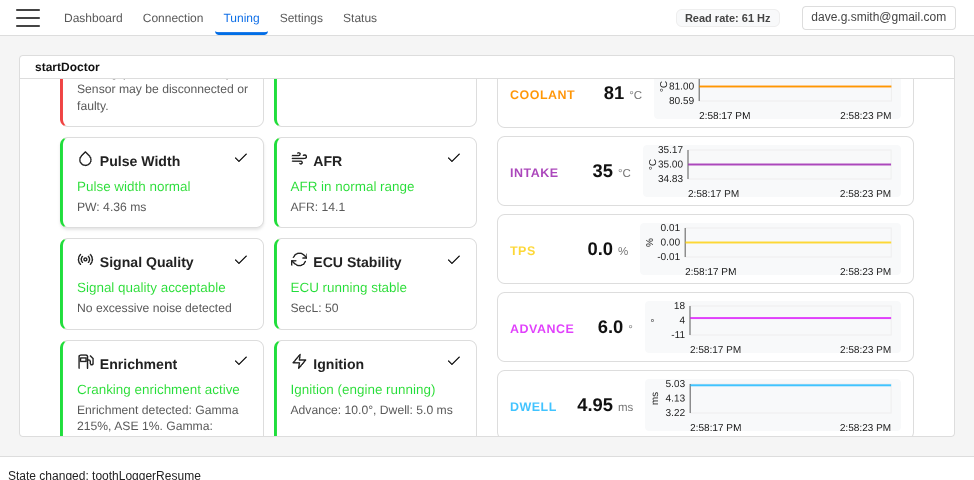
What the Doctor Checks
Battery Voltage
Checks battery voltage before and during cranking.
- Warns if voltage is below 12.0 V before cranking (battery not fully charged).
- Warns if cranking voltage drops below 9.5 V - borderline for reliable spark and injection.
- Fails if cranking voltage drops below 7.0 V - almost certain to cause misfires and no-starts.
- Advice includes checking the 12 V supply rail that goes live in RUN but is sometimes missing during cranking (a surprisingly common wiring issue).
Crank Sensor
Checks whether the ECU can see the engine turning.
- Fails if RPM remains at zero throughout cranking - no signal at all.
- Warns if RPM is erratic (standard deviation > 150 RPM) - check trigger wheel, air gap, and shielding.
- Monitors the ECU's sync-loss counter (
synccnt/syncLossCounter) - warns at 1+ events, fails at 3+. - Also detects RPM dropout - RPM briefly falling to zero while other channels remain normal - which is the signature of crank-position sync loss even without a dedicated counter.
- Monitoring continues into the RUNNING phase; sync losses during running will also be flagged.
MAP Sensor
Checks the manifold air pressure sensor in three phases:
At key-on (IDLE): MAP should be near atmospheric pressure (typically 85–110 kPa). A reading below 85 kPa suggests a blocked or kinked vacuum reference hose. A reading above 110 kPa is physically impossible on a naturally-aspirated engine at rest and suggests a damaged sensor or incorrect type configuration.
During cranking (CRANKING/FAILED): The Doctor tracks the minimum MAP seen throughout the cranking attempt. If MAP never drops below 80 kPa after cranking times out, it fails — the intake never built vacuum, which points to large vacuum leaks, a disconnected MAP hose, or very low compression.
If the throttle is open during cranking (detected from TPS), high MAP is expected, and the check is suppressed to avoid false positives.
While running (RUNNING): Checks for a stuck sensor — a variance below 1 kPa² while the engine is running indicates the sensor is disconnected or faulty.
Temperature Sensors
Checks that coolant (CLT) and intake air (IAT) temperatures are within plausible ranges.
- Warns if readings are outside −20 °C to 150 °C (CLT) or −40 °C to 80 °C (IAT).
- Auto-detects °F vs °C: if readings exceed the °C maximum but fall within the °F range, Fahrenheit is assumed and thresholds are adjusted accordingly.
Key-on divergence check: After a cold soak both sensors should read close to ambient. If CLT is below 40 °C and CLT and IAT differ by more than 20 °C, the Doctor warns of a sensor wiring or calibration fault. This check is suppressed when CLT is above 40 °C because the engine was recently run and CLT legitimately diverges from IAT.
Rapid transient spikes on CLT or IAT (a strong indicator of electrical noise or poor wiring) are caught by the Signal Quality check, not by this one.
TPS at Key-On
Checks throttle position before cranking begins (IDLE phase only). The throttle pedal should be fully released. If TPS is at or above the ECU's flood-clear threshold when you turn the key, the ECU will cut all injector pulses during the first crank attempt and the engine cannot start.
- Fails if TPS is at or above the ECU's flood-clear threshold (read directly from the tune file when available).
- Warns if TPS is close to the flood-clear threshold (≥ 80% of it) — a calibration offset or mechanical binding could push it over the threshold during the vibration of cranking.
- Warns if TPS reads 50% or higher and the ECU threshold is unknown (tune not loaded) — prompts loading the MSQ to confirm the exact setting.
Pulse Width
Confirms the ECU is actually commanding fuel delivery.
Prime pulse (key-on): Reads the prime pulse duration from the tune file. If prime pulse is set to 0 ms, warns — a small prime pulse (1–3 ms) wets the intake before the first crank and significantly improves cold-start reliability.
Cranking:
- Fails if the maximum commanded pulse width throughout cranking is below 0.5 ms — the ECU is not scheduling any fuel. Check injector wiring, fuses, fuel enable settings, cranking enrichment, and prime pulse duration.
- Fails if flood clear is active (high TPS cuts injector output — see the TPS at Key-On card for detail).
- Warns if cranking PW exceeds 15 ms — dangerously high and risks flooding the engine, especially on repeated failed starts.
- Warns if CLT is below freezing (0 °C / 32 °F) and mean cranking PW is below 2.0 ms — cold engines need significantly more fuel; this suggests cold-start enrichment may be disabled or the cold PW table is set too lean.
Running:
- Warns if commanded pulse width is below 0.3 ms — suspiciously low, engine may be lean or injectors inactive.
- Warns if pulse width exceeds 20 ms — possible duty-cycle saturation; check fuel pressure and injector sizing.
AFR
Checks the air-fuel ratio from your wideband or narrowband O₂ sensor.
- Fails if AFR is below 8.0 (extremely rich - stuck injector, fuel pressure issue, or sensor fault).
- Fails if AFR is above 20.0 (extremely lean - potential engine damage from detonation).
- Warns at AFR < 10.0 (rich) or > 18.0 (lean).
If the engine never fires and AFR reads rich, the Doctor interprets this as unburnt fuel passing the sensor (normal) and suppresses the AFR symptom so it does not drown out the real problem.
Signal Quality
Checks for excessive electrical noise on the battery voltage, MAP, TPS, CLT, and IAT channels using two complementary methods:
Spike detection (all phases, including cranking): detects large sample-to-sample jumps on any channel that exceed a per-channel threshold. Legitimate cranking changes - smooth battery voltage sag, gentle MAP pulsing - produce small deltas and do not trigger spikes. Sudden transients caused by bad grounds, poor shielding, or faulty sensor wiring do.
Variance analysis (idle, running, and failed phases only): warns if the standard deviation of battery voltage exceeds 0.3 V. A settled idle should have rock-steady battery voltage; sustained variance indicates alternator ripple or poor grounds. MAP and TPS are intentionally excluded from this check — both vary naturally with engine load, and genuine noise on those channels is already caught by the spike detector above.
ECU Stability
Monitors the ECU's seconds counter (SecL) to detect unexpected reboots.
- Warns on the first reboot - power supply, grounds, or alternator noise.
- Fails on two or more reboots - the ECU is crashing repeatedly.
- Natural byte-boundary wrap-arounds (255 → 0, 65535 → 0, etc.) are correctly ignored.
Enrichment
Checks the ECU's enrichment strategy (warm-up enrichment, after-start enrichment, air-density correction) that is needed to fire a cold engine.
- Reads enrichment values from the live data and cross-checks them against the ECU constants from your tune file.
- Requires the engine to have entered the RUNNING or FAILED phase before a conclusion is drawn.
Ignition Advance
Checks that cranking ignition advance is within a sensible range.
- Fails if peak advance exceeds 25° - excessive advance during cranking risks starter kickback and mechanical damage.
- Warns if advance exceeds 15° - most engines start most reliably between 6° and 10°.
- Warns if advance is below 2° - too little for reliable ignition.
- Warns if dwell is below 0.5 ms - coil may not be charging sufficiently for a strong spark.
ECU Errors
Reads the ECU's built-in fault code register and flags any active error codes.
Supports two firmware families:
- Speeduino: reads the
currentErroranderrorNumoutput channels. Decodes up to 13 fault codes covering shorted/grounded IAT, CLT, O2, TPS, MAP sensors and out-of-range battery voltage. - MS3: reads the
cel_statusbitmask (andcel_status2on newer firmware), covering sensor faults, trigger errors, cam sensor issues, fuel and oil pressure faults, flex sensor, and safety shutdowns.
Any active fault code produces a WARN or FAIL (severity follows the fault's documented impact). When a sensor is in limp-home mode the card shows the substitute value the ECU is using.
This check remains PENDING on firmware families that do not expose a fault code channel (e.g. MS2Extra).
Running Phase Analysis
Once the engine fires and the Doctor enters the RUNNING phase, three additional checks activate. These are not shown as separate cards but do appear in the Diagnosis overlay when issues are found.
Idle RPM Stability: Collects RPM samples during idle conditions (TPS at 0%, RPM between 400 and 1500) and calculates the coefficient of variation (CV = stddev / mean). A CV above 5% produces a Warning (mildly unsteady); above 10% produces a Fail (rough idle). Suggests checking vacuum leaks, IAC control settings, warmup enrichment, and idle ignition correction.
Idle AFR Accuracy: Compares mean idle AFR against the programmed target from the tune file. Warns at ±1.0 AFR units deviation from target; fails at ±2.0 AFR units deviation. If no target data is available, evaluates against the rich/lean warning thresholds instead.
Post-Throttle RPM Stability: Watches RPM in the 3 seconds after the throttle closes from an open position. An RPM drop greater than 250 RPM produces a Warning; a drop greater than 400 RPM or RPM falling below 600 produces a Fail (near-stall). Reads DFCO configuration and IAC type from the tune file to give specific advice about re-engage RPM, fuel cut settings, and IAC idle-up.
The Diagnosis
When the consultation ends (you press Stop, the engine starts, or cranking times out), the Diagnosis overlay appears automatically.
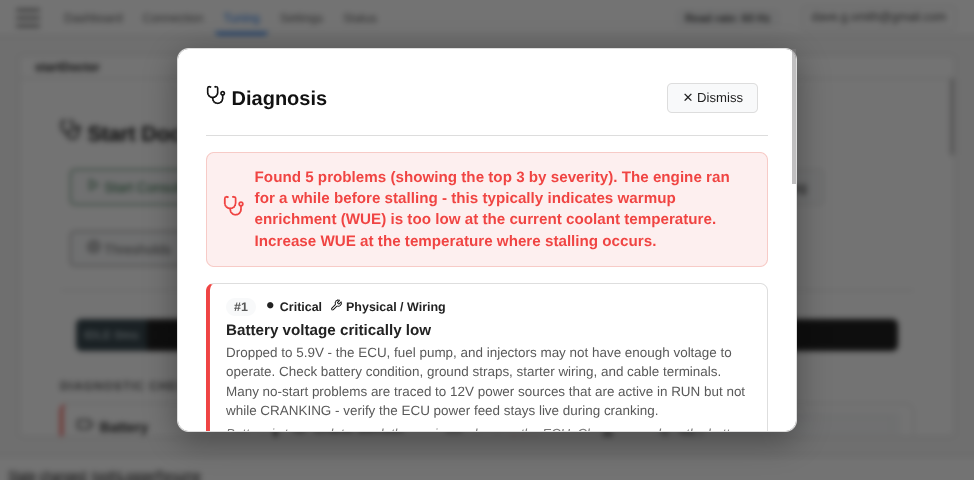
The overlay shows:
- A summary line - "All clear" or the number of problems found.
- Up to three ranked problems, each with:
- A severity badge (🔴 Critical / 🟡 Warning).
- A type badge - ⚙️ Configuration (fixable in the app) or 🔧 Physical (wiring / hardware).
- The problem title and the detail message from the diagnostic card.
- Advice text in italic.
- For configuration problems, a Open [Settings] → button that navigates directly to the relevant settings dialog.
- A footer note if more than three issues were found.
How problems are ranked
The Doctor uses a heuristic expert system that reasons about cause and effect:
- Root causes are promoted to the top. If the pulse width check fails (ECU not commanding fuel), that is ranked above a lean AFR reading, because the lean condition is a consequence of the missing fuel command, not an independent problem.
- Downstream consequences are suppressed to avoid noise. A rich AFR when the engine never fired is expected (unburnt fuel passing the sensor) and is filtered out unless it persists after firing.
- ECU reboots are always raised to highest priority - an unstable ECU makes every other check unreliable.
- Stall patterns influence enrichment diagnosis: a stall within three seconds of starting points straight at after-start enrichment (ASE); a stall within thirty seconds points to warmup enrichment (WUE).
Stall pattern classification
If the engine starts and then stalls, the Doctor classifies the stall:
| Pattern | Stall after | Most likely cause |
|---|---|---|
| Immediate | < 3 seconds | After-start enrichment (ASE) too low or tapering too fast |
| Warmup | 3 – 30 seconds | Warmup enrichment (WUE) insufficient at current temperature |
| Running | > 30 seconds | Fuelling or ignition issue at the operating point |
Threshold Overrides
Advanced users can adjust the thresholds used by each check. Click ⚙️ Thresholds in the header to open the drawer.
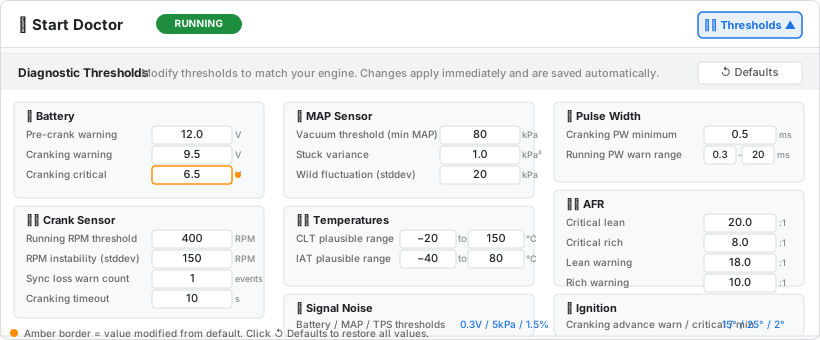
Thresholds are organised into nine groups - Battery, Crank Sensor, MAP Sensor, Temperatures, Signal Noise, Pulse Width, AFR, Ignition, and Stall Detection.
- Modified values are highlighted with an amber border so you can see at a glance what has been changed.
- Changes apply immediately to the running consultation.
- Values are saved to
localStorageunderstartDoctor_thresholdOverridesand persist across sessions. - Click ↺ Defaults to restore all thresholds to the built-in values.
Overrides survive ↺ Reset - they are configuration, not session state.
Loading a Log File
You do not need a live ECU connection to use the Start Doctor. Click Load Log (in the Start Doctor header bar) to load a previously recorded log file (MLG, MSL+MSQ, or JSON recording). VETuner replays the log through the same Start Doctor engine, giving you a full analysis of a past cranking attempt.
VETuner Pro required. Loading a previously saved log file is a VETuner Pro feature. Upgrade to VETuner Pro to unlock log file analysis.
This is useful for:
- Diagnosing a friend's engine based on a log they have sent you.
- Comparing before-and-after logs after making a change.
- Getting a diagnosis on a log file captured on the dyno or during a road session.
Tips
- Record multiple attempts. The Doctor analyses one cranking event per consultation, but you can load the same log file multiple times to examine different attempts within it, or load separate recordings.
- Share the auto-captured log. Every consultation automatically creates a log file. If you cannot diagnose the problem yourself, share that file with someone else who can load it in VETuner.
- Check battery first. A low battery affects almost every other check. A fully charged battery (12.6 V resting) eliminates one of the most common no-start causes before you investigate anything else.
- Cranking advance matters. Many people tune the running advance tables carefully and ignore the cranking advance. If the Ignition card warns about high advance, lowering the cranking advance to 8°–10° is a quick win.
- Trust the suppression. If you see only one or two problems after a complicated-looking crank, the Doctor has already filtered out the downstream noise - focus on what the Diagnosis actually highlights.
Related guides
- Starting Your Engine - first-time starting checklist and guidance
- Connecting to Your ECU - setting up a live ECU connection
- VE Analysis - automated VE table correction once the engine is running reliably
- Editing Tuning Tables - apply and persist the configuration changes identified by diagnosis