VE Analysis
VE Analysis automates the tedious process of adjusting your VE (Volumetric Efficiency) table to achieve your target AFR (Air-Fuel Ratio).
How it works
- VETuner watches the live wideband AFR reading from your O2 sensor while you drive
- Each moment is recorded against where in the RPM/load map you are (using bilinear interpolation to identify which cells are active)
- The actual AFR is compared against your tune's target
- Over time this builds a statistical picture of which cells are lean or rich, accounting for O2 sensor lag and other sources of noise
- Finally, VETuner calculates the percentage adjustment each cell needs and applies it to a copy of your VE table
Running VE Analysis
- Connect to your ECU and ensure a wideband O2 sensor is configured
- Open the VE Analysis tab
- Click Start Analysis and go for a drive - try to cover all areas of the RPM/load map
- VETuner shows a live heat map of the adjustments suggested so far — switch the Select Display dropdown to Updated VE Table to see the adjusted values, or Delta VE Table to see the percentage change per cell
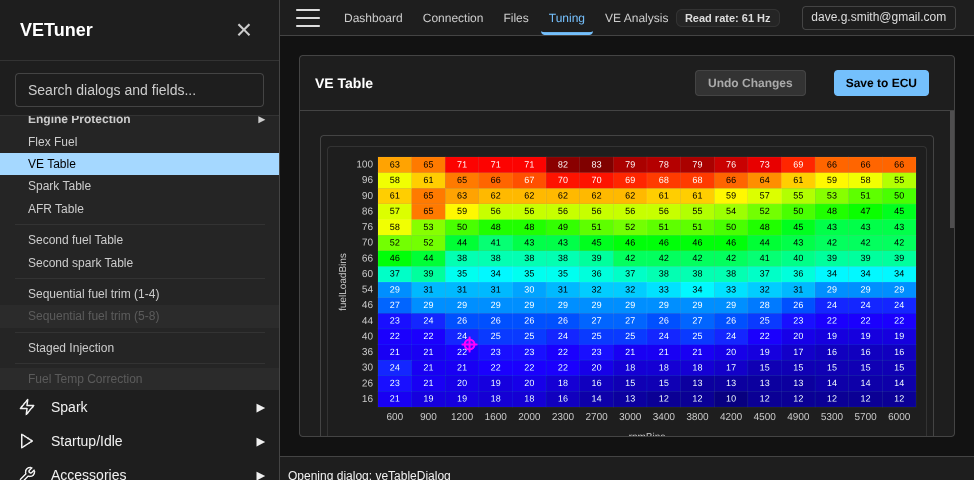
- When satisfied with the results, open the VE Table directly from the Configuration menu and apply the suggested values manually, using the analysis heat maps as a reference guide
Tips for good results
- Cover the full map - spend time in each RPM/load region, especially the areas you use most in normal driving
- Avoid transients - steady throttle and steady RPM give the cleanest data; hard accelerations confuse the O2 sensor lag compensation
- Warm engine - run VE Analysis with the engine fully at operating temperature
- Multiple sessions - you can run several sessions and accumulate data; VETuner merges them statistically
Reading the heat map
The VE Analysis heat map shows the suggested percentage change for each cell:
- Blue - cell is rich; VE values should decrease
- Red - cell is lean; VE values should increase
- Grey - insufficient data; the cell has not been visited enough to make a reliable suggestion
O2 sensor delay compensation
VETuner automatically calculates the delay between a fuelling event and when the exhaust gas reaches the O2 sensor, based on engine RPM and exhaust system geometry. This compensation is essential for accurate VE corrections at higher RPM.
You can adjust the delay parameters in Settings → VE Analysis.
Related guides
- Editing Tuning Tables - where VE changes are reviewed and burned to ECU flash.
- Data Logging for VE Analysis - practical logging workflow for clean data.
- Lambda and AFR - interpret sensor readings and target choices correctly.