VETuner Pro
VETuner is free to use for core ECU tuning. A VETuner Pro subscription unlocks the full feature set, including advanced diagnostic and visualisation tools that go beyond basic table editing.
Subscribe from Settings → Subscription inside the app. You need a free account to subscribe - sign up or sign in from the Account item in the sidebar.
What's included in VETuner Pro
Advanced Mode
Subscribing upgrades you from Focus Mode to Advanced Mode. Advanced Mode reveals the full application interface:
| Feature | Focus Mode | VETuner Pro |
|---|---|---|
| Dashboard (live gauges) | ✅ | ✅ |
| Connection & file loading | ✅ | ✅ |
| Tuning table & curve editor | ✅ | ✅ |
| Start Doctor | ✅ | ✅ |
| Settings | ✅ | ✅ |
| Config Health Check | ✅ | ✅ |
| Tune Diff Report | ✅ | ✅ |
| VE Analysis tab | ❌ | ✅ |
| Graph tab | ❌ | ✅ |
| Tooth Logger tab | ❌ | ✅ |
| Data Table tab | ❌ | ✅ |
| Event Log tab | ❌ | ✅ |
| Full ECU menu | ❌ | ✅ |
| Log Recording & Playback | ❌ | ✅ |
| CAN Bus Discovery | ❌ | ✅ |
| Idle Advance Doctor | ❌ | ✅ |
| GPS Route Map | ❌ | ✅ |
| GPS Tracking | ❌ | ✅ |
| Cloud Sync | ❌ | ✅ |
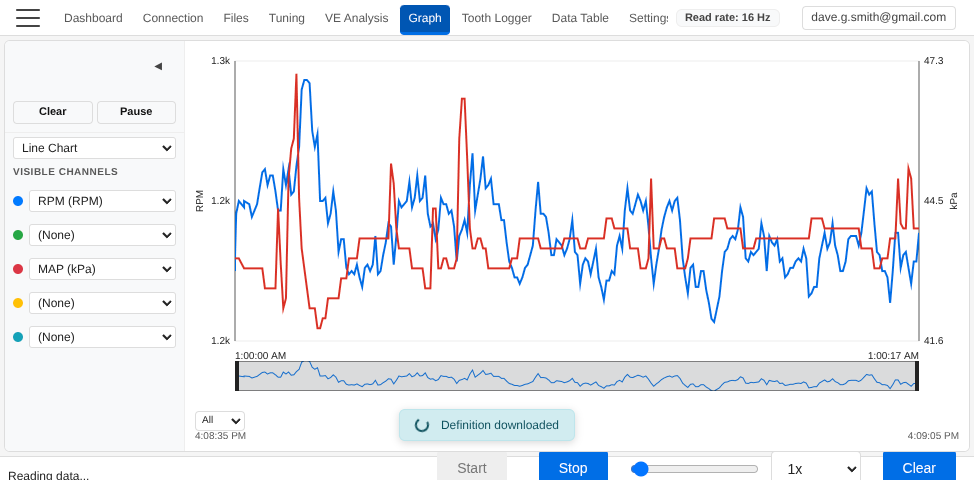
Real-time Graph
A live multi-channel line chart that plots any ECU output channel at up to 50 Hz. Transient fuelling, ignition and sensor behaviour that vanishes in a static gauge display shows up clearly here.
Tooth Logger
Captures and displays the raw crank and cam trigger signals as seen by the ECU. When a trigger wheel, air gap or shielding problem is causing sync loss and misfires, this is where you see it happen.
Log Recording & Playback
Start and stop log recording directly from the app, add named markers at key moments, and replay previously recorded sessions. All log formats (MLG, MSL+MSQ) can be loaded back into any VETuner tool - including the Start Doctor.
Full ECU Menu
In Focus Mode, the sidebar shows a curated menu of the most important dialogs. VETuner Pro expands this to the complete INI-driven menu - every dialog, table, and curve defined in your ECU's definition file, accessible from the sidebar search.
Idle Advance Doctor
Analyses idle stability in real time by monitoring RPM fluctuations and ignition advance patterns. It classifies the idle behaviour (stable, hunting, dropping, surging) and suggests advance table adjustments to improve idle quality. After a vacuum leak, an injector change or a cam swap, look here first.
VE Analysis
The VE Analysis tab uses statistical scoring to identify which cells in your VE table are lean or rich, accounting for O2 sensor lag. It generates a heat map of suggested corrections and shows a delta table of adjustments. Available in the toolbar once a wideband sensor is configured and data has been collected.
Premium Gauge Designs
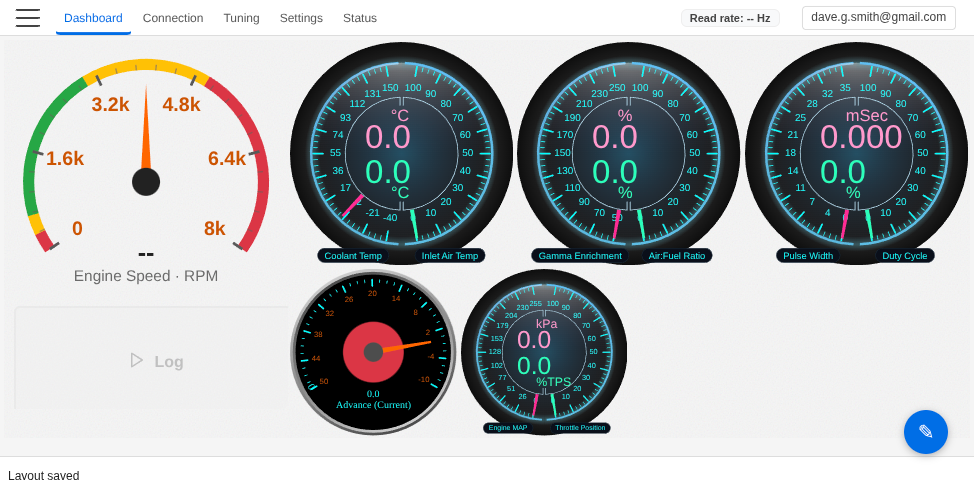
VETuner Pro unlocks additional gauge styles in the dashboard gauge editor:
- SVG Design 1 & 2 - high-quality vector circular gauges
- Linear Design 1 & 2 - horizontal/vertical bar-style gauges
- Dual-Channel Design - a single gauge tile showing two channels simultaneously
Subscribing
VETuner Pro costs £10 per year. Your first month is free — no payment is taken until the trial ends.
- Open the app and click Sign In in the sidebar (or create a free account).
- Go to Settings → Subscription.
- Click Subscribe - you will be taken to the secure checkout.
- Once payment is confirmed, VETuner Pro is activated immediately and the advanced features unlock without needing to reload.
Subscriptions are managed through Polar.sh. You can cancel at any time from the Polar customer portal - your access continues until the end of the current billing period.
Using Pro offline
A Pro subscription keeps working without an internet connection; only the server-backed features (Cloud Sync, vehicles, cloud dashboards, cloud logs, Engine Expert) need one. See Using VETuner Offline for full details.
Related guides
- Starting Your Engine - initial setup and ECU connection
- VE Analysis - automated VE table correction
- Start Doctor - engine no-start diagnostics
- Connecting to Your ECU - live connection and file-only mode with no ECU
- Using VETuner Offline - what works with no internet connection