VETuner
VETuner is a browser-based ECU tuning application for Speeduino and MegaSquirt ECUs. It runs entirely in your web browser; no software installation required. Use it on your phone, tablet or laptop.
What can VETuner do?
- Connect directly to your ECU over USB or serial using the Web Serial API built into Chrome and Edge
- Start Doctor Watches you as you crank your engine, diagnoses common problems and offers advice on how to get your engine running and idling
- Read and write tuning tables (VE table, ignition advance, AFR targets, and hundreds more) directly on the ECU
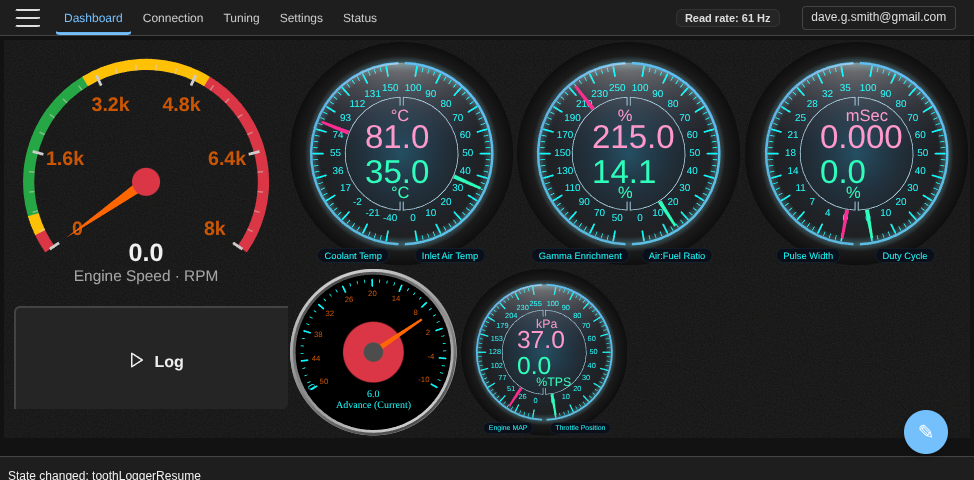
- Visualise real-time data with live gauges, a configurable dashboard, and colour-coded heat maps
- Analyse volumetric efficiency by recording a drive log and letting VETuner calculate the adjustments your VE table needs
- Monitor external sensors over Bluetooth - connect temperature probes via Shelly Pill and display readings alongside ECU data
- Load and save tune files in the standard MSQ format, compatible with TunerStudio
- Work with no internet connection - VETuner caches itself on your device and keeps running in a garage or anywhere with no signal. See Using VETuner Offline
Suggested reading path
If you are new to VETuner, follow this sequence:
- Connecting to Your ECU - establish a stable connection and verify serial comms.
- Using VETuner Offline - what keeps working with no internet connection.
- Starting Your Engine - run first-start checks and use Focus Mode.
- Configuration Health Check - understand the sanity checks VETuner runs on your ECU.
- Start Doctor - diagnose no-start and unstable cranking behaviour.
- Editing Tuning Tables - make safe table changes and burn/save correctly.
- VE Analysis - automate VE correction once the engine is warm and stable.
For theory and deeper tuning concepts, continue into the Advanced section: